Most SEO advice for retirement blogs is written for a different reader: a younger person who types two or three words and clicks the first result. Readers planning retirement tend to search differently. They ask full questions, they read before they act, and they check whether the site behind the answer looks trustworthy. A blog that fits those habits can earn steady visitors who are ready to act on a recommendation.
This guide covers each step without code or paid software. If you are still building the blog, starting an affiliate blog as a retiree is a great place to begin. If you write for younger readers as well, the keyword approach in this post on student-loan SEO for millennials is different and should stay separate from this one.

How readers over 55 actually search, and why it changes your keywords
A reader close to retirement is often making a decision with real money attached and few chances to undo it. That shapes the search. Instead of “annuity rates,” the query is more likely “is an annuity a good idea at 65 if I have a pension.” The longer phrase carries the person’s situation, and it tells you exactly what the page has to address.
Three habits show up again and again in how cautious readers search:
- Full questions. They type the way they would speak to an adviser: who, what, when, should I, can I.
- Comparisons before commitment. Searches such as “X vs Y,” “alternatives to X,” and “is X worth it” come before any purchase.
- Checking the source. Many will look for an About page, a name, a date, and a disclosure before they believe a recommendation.
For your keyword choices, this means long, specific phrases are your main targets. They have fewer searches each than short phrases, but the person typing one knows what they want, and fewer sites answer them well. A page written for “can I work part time and claim Social Security early” can outperform a page written for “retirement income” because it speaks to one person’s actual problem.
Finding question-style keywords with free tools and a notepad
You can build a solid keyword list with a search engine and a notepad. Start with a seed topic, such as “retirement income from part-time work,” and type it into Google without pressing enter. The suggestions that appear below the box are real searches people make. Write down every one that reads like a question.
Then run the search. Three places on the results page add more ideas:
- The “People also ask” box, which lists related questions and expands as you click.
- The “Related searches” list at the bottom of the page.
- The titles of the pages already ranking, which show how others word the same problem.
If your site is already getting some visits, Google Search Console is free and shows the actual phrases people used before reaching you. Look for questions where your page appears, but few people click, since those pages usually need a better title or opening. Reader emails and blog comments are another source. When someone asks you a question directly, others are almost certainly typing it into a search box.
Keep the notepad simple, with three columns: the question, the worry behind it, and the page on your site that answers it. A question with no page beside it becomes your next article. A question with a page that only partly answers it becomes an update.
Matching what the searcher wants: the page type each keyword needs
Every phrase carries an intent, and the page has to be the kind of page that intent calls for. A reader who types “how does a Roth conversion work” wants an explanation. If they land on a list of products with affiliate links, they leave. The reverse also happens: a reader comparing two tools wants a side-by-side page, and a general essay will not hold them.
A workable sorting of phrases looks like this:
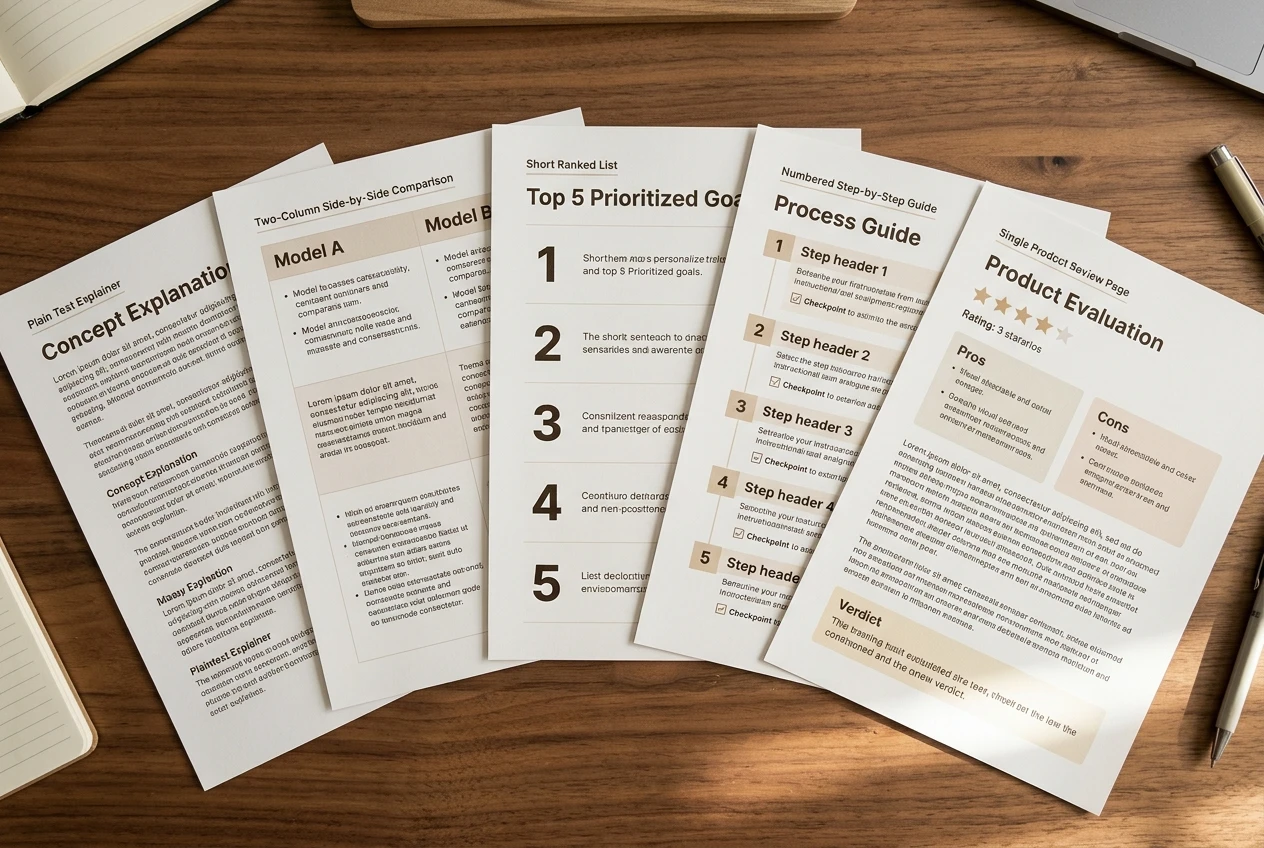
- “What is,” “how does,” “can I”: an explainer that answers in plain language and gives no sales push.
- “X vs Y”: a comparison page with the differences laid out for someone choosing between them.
- “Is X legit” or “X review”: an honest review that includes who the product does not suit.
- “Best X for retirees”: a short roundup with clear reasons for each pick.
- “How to start” or “step by step”: a guide in numbered order.
Buyers tend to arrive through the comparison, review and roundup pages, while explainers earn trust and bring people into your site early. Deciding whether a product deserves a review matters just as much, and telling a good high-ticket affiliate program from a risky one helps you make that call before you put your name on it.
Give each phrase one page. Two pages chasing the same question compete with each other, and the reader sees two half-answers instead of one good one.
Writing titles and openings that earn the click from a cautious reader
A cautious reader distrusts hype. Words like “secret,” “shocking,” and “guaranteed” signal the kind of site they are trying to avoid. A plain title that repeats their question and says what they will get does better with this audience.
Compare two versions for the same page:
- “The Retirement Income Secret Banks Don’t Want You to Know”
- “How Much Can You Earn Part Time Before It Affects Social Security?”
The second reads like an answer. It uses the searcher’s own words, and the reader can tell what the page covers before clicking. Keep titles to roughly 60 characters where you can so they are not cut off in the results, and put the main phrase near the front.
Put a year in a title only when the content depends on it, such as contribution limits or rules that change. When you do, use the current year, and check the page again when the year turns, because a stale year makes a page look neglected.
The opening paragraph matters just as much. Answer the question within the first two or three sentences, then say what the rest of the page covers. A reader who sees their question answered right away trusts that the rest is worth reading. Write the short description that appears under your title in the results the same way: one or two plain sentences that say what the page answers.
Trust signals that matter more to this audience
For a reader weighing a financial decision, trust is a ranking factor in practice: they will leave a site that feels anonymous or careless, and those visits do nothing for you. Four signals do most of the work.
Author story
Add an About page and an author note on articles that says who writes the site, why it exists and who it is for. Include only what is true and that you are comfortable sharing, such as your name, your reason for writing about retirement income and what you do and do not offer. If you are not a licensed financial adviser, say so plainly and state that the site shares general information, not personal advice. Readers find this more believable than a long list of credentials.
Disclosure
Tell readers you earn commissions, in ordinary words, near the first affiliate link on each page and again on a dedicated disclosure page. Rules differ by country. In the US, the Federal Trade Commission expects disclosures to be clear and placed close to the link, not tucked away in a footer. Honest disclosure does not drive older readers off. Hiding it does.
Sources
When you state a rule, a limit, or a figure, link to the official source, such as the Social Security Administration or the IRS for US readers. Name the source in the sentence so the reader knows where the claim comes from. Where something depends on personal circumstances, say it depends and suggest they check with a qualified professional.
Dates
Show a “last updated” date at the top of each article and mean it. When you recheck a page and change a figure, change the date. When you recheck it and nothing has changed, note that you checked it. Retirement rules shift, and a visible date shows the reader the information is maintained.
Readable pages: font size, layout, and speed on a tablet or older phone
Many of your readers will open your site on a tablet or a few-year-old phone, often with reading glasses. A page that is hard to read loses the visitor before any of your trust work has a chance.

Check these on your own site:
- Text size. The smallest default sizes are tiring to read. Many bloggers set body text around 18 pixels or larger for this audience.
- Contrast. Dark text on a plain light background is easiest. Pale grey text on white looks stylish and is hard to read.
- Line spacing and width. Leave generous space between lines and keep paragraphs short, so the eye does not lose its place.
- Links and buttons. Make link text descriptive, such as “compare the two plans,” instead of “click here,” and make buttons large enough to tap accurately.
- Pop-ups. Avoid anything that covers the page or is hard to close on a small screen.
Speed matters as well. Large images are the most common cause of slow pages, so resize photos before uploading them, and remove plugins you do not use. Google’s free PageSpeed Insights tool tests any page and lists what slows it down, in plain terms. Then open your site on a phone and a tablet and read one full article as a visitor would.

Internal links that guide a reader from worry to a decision
Most visitors arrive with a worry, not a purchase in mind. Your internal links can lead them from the worry to the decision in sensible steps, with no pressure at any point.
Think of each topic as a short path. A reader starts on an explainer about a worry, such as whether savings will last. A link in the text leads to a more specific page, such as how part-time income changes the picture. From there, a comparison or review page helps them choose a tool or service. Each page should link to the next logical one, using anchor text that says what the reader will find.
Foundation articles that stay accurate for years are good places to link from, because they keep collecting visitors. A post like “Creating evergreen personal finance posts for early retirement planning” explains how to build them. Not every reader will be ready to decide on the first visit, so offer a way to come back. An email list lets you stay in touch with people who are still thinking it over, and a budget-friendly guide to building a personal finance email list explains how to set it up.
Keep affiliate links on pages where the reader is already comparing or choosing. Explainer pages work better with links to your own related pages.
A simple monthly SEO routine you can finish in an hour a week
Steady work beats occasional bursts. Four one-hour sessions a month cover everything above.
- Week one, find questions. Spend the hour on autocomplete, “People also ask” and Search Console. Add five new questions to the notepad and mark which already have a page.
- Week two, write or improve one page. Either draft a new article for a question with no page, or rewrite the title and opening of an existing one that gets impressions but few clicks. Match the page type to the intent.
- Week three, trust and readability. Check dates on your three oldest articles, confirm sources still say what you claim, and read one page on a phone. Fix anything that is hard to read.
- Week four, links and review. Add internal links from older pages to the new one, and look at which pages brought visitors this month. A tool that tracks affiliate revenue and traffic can show which pages drive clicks on your links.
Keep a short log of what you changed and when. After a few months it shows which kinds of pages are working, and the notepad shows which questions are still unanswered.
This article was created with AI assistance and reviewed by a human editor.